MCP is an open-source standard for connecting AI applications to external systems.1 It lets an application like Claude or ChatGPT reach data sources (local files, databases), tools (search engines, calculators), and workflows (specialized prompts) — so the model can get at information it needs and take actions.
The documentation’s own analogy is the one worth keeping:
Think of MCP like a USB-C port for AI applications. Just as USB-C provides a standardized way to connect electronic devices, MCP provides a standardized way to connect AI applications to external systems.1
The analogy earns its keep because it names the right problem. USB-C didn’t make devices more capable; it removed the N×M adapter problem. MCP is the same bet on the other axis of the agent stack — where A2A standardizes agent-to-agent communication across organizations, MCP standardizes the connection down from a model to its tools and data.
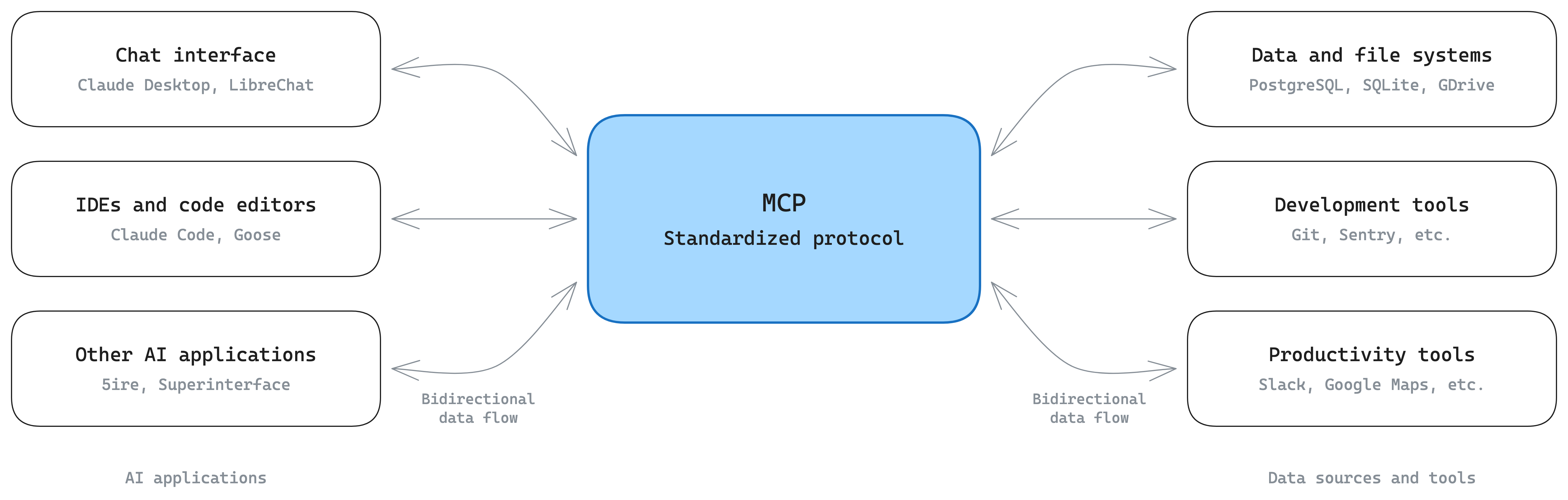
Diagram
Open the interactive version here to pan and zoom.
What it enables
The documentation’s examples are deliberately concrete:1
- Agents reaching your Google Calendar and Notion, acting as a more personalized assistant.
- Claude Code generating an entire web app from a Figma design.
- Enterprise chatbots connecting to multiple databases across an organization so users can analyze data by chat.
- Models creating 3D designs in Blender and printing them on a 3D printer.
The benefit is framed by where you sit: developers get less integration time and complexity; AI applications get an ecosystem of data sources and tools they didn’t have to individually integrate; end users get applications that can actually reach their data and act on their behalf.1 Support is broad — Claude, ChatGPT, VS Code, Cursor and others all speak it, which is what makes “build once, integrate everywhere” more than aspiration.
Core concepts of the architecture
Version note. What follows tracks documentation version 2026-07-28, which differs from widely circulated older accounts of MCP in two ways that matter: the protocol is now stateless with a
server/discoverrequest in place of the oldinitializehandshake, and the sampling and logging client primitives are deprecated.2
Participants
MCP is client-server, with three named roles:2
- MCP Host — the AI application that coordinates and manages one or many MCP clients.
- MCP Client — a component that maintains a connection to one server and obtains context from it for the host to use.
- MCP Server — a program that provides context to clients.
The structural detail that’s easy to miss: the host creates one client per server, and each client holds a dedicated connection. VS Code connecting to the Sentry server instantiates one client object; connecting also to the local filesystem server instantiates a second. The fan-out lives in the host, not in a single multiplexed connection.
“Server” refers to the program serving context regardless of where it runs. A filesystem server launched by Claude Desktop runs locally over stdio — a “local” server; the Sentry server runs on Sentry’s platform over Streamable HTTP — a “remote” one. Local servers typically serve a single client, remote ones typically serve many.
Two layers
MCP is defined as two layers, with the data layer inner and the transport layer outer:2
- Data layer — the JSON-RPC 2.0 protocol for client-server communication: capability and version discovery, and the core primitives (tools, resources, prompts, notifications).
- Transport layer — the communication channels: connection establishment, message framing, and authorization.
Two transports are defined. Stdio uses standard input/output for direct process communication on the same machine, with no network overhead. Streamable HTTP uses HTTP POST for client-to-server messages with optional Server-Sent Events for streaming, enabling remote servers and standard HTTP authentication — bearer tokens, API keys, custom headers — with OAuth recommended for obtaining tokens.
The point of the split is that the transport abstracts away communication details, so the same JSON-RPC message format works across every transport.
Statelessness and discovery
MCP is a stateless protocol: every request carries everything needed to
process it, so a server infers nothing from previous requests.2 Each
request puts the protocol version and the relevant capabilities in its _meta
field, and clients should identify themselves there too unless configured
otherwise.
Servers advertise supported versions and capabilities through the mandatory
server/discover request, which a client may send before anything else.
Calling it is optional — since every request carries the same _meta, a
client can just send what it wants and handle a version error if one comes
back. Discovery is a convenience that fetches identity, capabilities, and
supported versions in one round trip, and its response is typically cacheable
(ttlMs, cacheScope).
Version negotiation is explicit: if a server doesn’t support the requested
version it rejects with UnsupportedProtocolVersionError listing what it does
support, and the client retries with a mutually supported version.
Primitives
Primitives are the most important concept in MCP — they define what clients and servers can offer each other.2
Servers expose three:
| Primitive | What it is | Example |
|---|---|---|
| Tools | Executable functions the application can invoke to perform actions | file operations, API calls, database queries |
| Resources | Data sources providing contextual information | file contents, database records, API responses |
| Prompts | Reusable templates structuring interactions with the model | system prompts, few-shot examples |
Each type has methods for discovery (*/list), retrieval (*/get), and where
applicable execution (tools/call). Clients call */list first, which is what
allows listings to be dynamic rather than fixed at build time.
The documentation’s worked example is a database server: tools for querying it, a resource holding the schema, and a prompt carrying few-shot examples for using the tools. That triad is a good test of whether you’ve understood the distinction — the same subject matter, split by whether it’s an action, a fact, or a template.
Clients expose one:
- Elicitation — lets a server request additional information from the user,
or ask for confirmation of an action, via
elicitation/create.
Two client primitives are deprecated as of 2026-07-28:2
sampling (servers requesting model completions from the client’s
application, so a server could use a model without embedding an LLM SDK — new
implementations should integrate directly with provider APIs) and logging
(new implementations should log to stderr on stdio, or use OpenTelemetry).
Beyond the core, optional extensions build on the protocol — the Tasks extension, for instance, returns a durable handle for long-running requests so clients can poll and collect the result later.
Notifications
The protocol supports real-time notifications so servers can report changes
without being polled — most usefully when a server’s available tools
change.2 These are JSON-RPC notification messages, sent with no id
and expecting no response.
They are opt-in. The client opens a long-lived subscriptions/listen stream
naming the notification types it wants; the server acknowledges with the subset
it agreed to honor, and every notification on that stream carries the
subscription’s ID in _meta so the client can correlate it. Delivery is
explicitly best effort — no guarantee every notification arrives,
particularly across transport reconnects — so clients are told to keep polling
to preserve freshness. That caveat is worth internalizing: notifications are an
optimization over polling, not a replacement for it.
What MCP deliberately doesn’t do
The scope note is short and load-bearing:
MCP focuses solely on the protocol for context exchange—it does not dictate how AI applications use LLMs or manage the provided context.2
So MCP will move a resource into your application, and says nothing about whether that resource belongs in the context window. Deciding that is context engineering, and the two fit together exactly at this seam: MCP is the transport for just-in-time retrieval, while the attention-budget reasoning about what to load and when sits above the protocol. Anthropic’s warning about bloated tool sets with ambiguous decision points is a warning about how you use MCP, not about MCP itself.
The project’s scope covers the specification, SDKs for various languages, development tools including the MCP Inspector, and a set of reference server implementations.2
Where it sits
MCP and A2A are complementary rather than competing, and
the two pages should be read together: MCP connects a model down to tools and
data, which are stateless and predefined; A2A connects an agent across to peer
agents, which are autonomous and multi-turn. The
single-agent pattern is where MCP
does most of its work — one model, one tool set — and the failure mode that
pattern runs into as tools accumulate is the same one MCP’s tools/list growth
produces in practice.
Footnotes
-
“What is the Model Context Protocol (MCP)?”, MCP documentation, version 2026-07-28. Local copy:
references/mcp-getting-started-intro.md. ↩ ↩2 ↩3 ↩4 -
“Architecture overview”, MCP documentation, version 2026-07-28. Local copy:
references/mcp-architecture-overview.md. ↩ ↩2 ↩3 ↩4 ↩5 ↩6 ↩7 ↩8 ↩9